

Online Cricket ID: Get a Real
Exchange Account the Simple Way
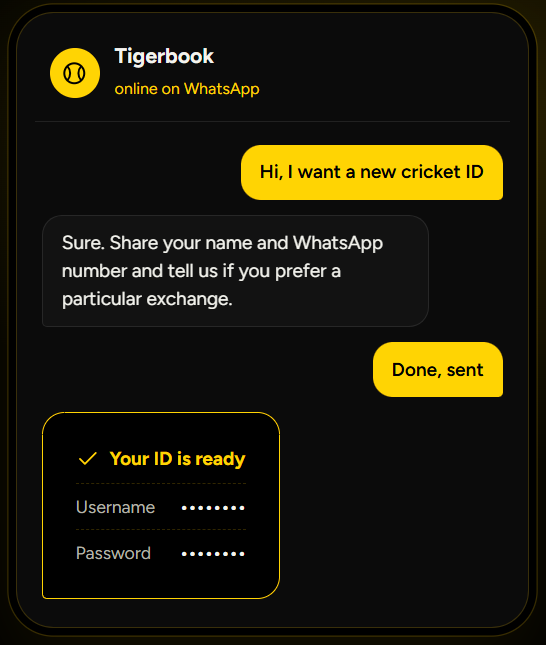
You message on WhatsApp. A few minutes later you receive a working username and password for a cricket exchange. That simple process is what most people look for when they search online for “cricket ID” or “cricket betting ID.”
Tigerbook helps you get that account from trusted partner exchanges. We create the id, send the details, and stay available for login help or basic questions. We never take or place bets on your behalf. You stay in full control of your money and all your decisions.
Our guide covers everything in clear steps. You will find out what the ID actually does, how to get one, which exchanges are reliable, the top leagues you can follow, the most common bet types, deposit options, and safety tips.
What an Online Cricket ID Gives You
An online cricket ID is your personal login on a betting exchange platform. With it you can see live odds, place bets, deposit money, and withdraw winnings.
The main markets you see are:
Live Match Updates
Check match scores and current match status.
Live Odds
View live odds that change with match conditions.
Market Options
Explore available markets for different cricket matches or league.
Mobile Access
Access your account through a mobile browser.
Account Security
Protect your login details and payment information.
The same ID often works for other sports and some casino games, but cricket stays the main use for most Indian users.
Why Does Getting a Cricket Betting ID Feel Difficult?
Many people try to register directly on betting exchange sites. They face long forms, document requests, OTP verification, or accounts that stop working after a short time. Others buy IDs from random WhatsApp numbers and after some time they find the account was shared or already blocked.
A clear provider reduces these risks by creating a fresh account and staying reachable for support every time.
Typical problems include:
- Login details that fail after the first deposit
- Slow or missing withdrawals
- No one to contact when something goes wrong
- Odds that do not match what was shown earlier
How Tigerbook Helps You
Tigerbook works with more than twenty partner exchanges. When you contact us we check current availability, create a clean and save account, and send the login details on WhatsApp.
After you receive the id we help with:
Login steps
We Will give guidance to get into your new account.
Deposit with UPI
How to deposit with UPI.
First bet
Guide you how to place a bet on live games.
Other exchanges
Suggestions if one exchange does not suit you.
Demo ids
Demo ids if you want to practise first.
We never ask for your bank OTP or password. We never place bets on your behalf.
Steps to Get Your Online Cricket ID

Open WhatsApp and message the number shown on tigerbook.live.

Say you want a new cricket id. You can name a preferred exchange if you have one.

Share the basic details we ask for (usually name and WhatsApp number).

We create the account on a partner exchange.

You receive the username and password in the same chat, usually within a few minutes.

Deposit the minimum amount shown in the account using UPI.

Log in and start using the markets.

Reply on the same chat if any step feels unclear. We guide you in real time.
Best Cricket Betting Exchanges Available Through Tigerbook
Here are Top ten partner exchanges that currently accept new accounts. Availability can change, so we always confirm the latest options when you message us.
| Exchange | Best For | Min Deposit | Withdrawal Time | Main Strength |
|---|---|---|---|---|
 Lotus365
 | Mobile and live markets | ₹100–300 | 5–15 minutes | Clean app and single wallet |
 1xbet
1xbet | Session and fancy betting | ₹100–500 | Often under 10 min | Deep markets and liquidity |
 1win
1win | Long-term regular users | ₹300–500 | Fast | Stable platform for years |
 4RABET
 | North Indian users | ₹300–1000 | 30–60 minutes | Wide range of markets |
 TigerExch
 | Back and lay exchange style | ₹200–300 | 5–15 minutes | Peer-to-peer odds |
 Sky Exchange
 | Live streaming matches | ₹300–500 | Fast | Streaming on selected games |
 Parimatch
 | Multi-sport users | ₹200 | Fast | Cricket plus other sports |
 Betbhai9
 | High-volume session traders | ₹300–500 | 10–20 minutes | Strong session liquidity |
 Rajabet
 | New users seeking offers | ₹300 | Around 15 minutes | Higher first deposit options |
 Diamond Exchange
 | Simple first-time experience | ₹100–300 | Fast | Easy interface for beginners |
Cricket Leagues and Formats You Can Follow
Once you have the id you can access markets on almost every major cricket event. Here are ten popular leagues and formats that stay active most of the year.
| League / Format | Type | Typical Season | Popular Markets |
|---|---|---|---|
| 🏆 Indian Premier League | T20 franchise | March–May | Match winner, session, player props |
| 🏆 Women’s Premier League | T20 franchise | February–March | Match winner, top batsman |
| 🚩 ICC T20 World Cup | International T20 | Every 2–4 years | Tournament winner, group matches |
| 🚩 ICC Cricket World Cup | ODI | Every 4 years | Match winner, series winner |
| 🎾 Bilateral T20 Series | International | Year-round | Live odds, session runs |
| 🎾 Bilateral ODI Series | International | Year-round | Match winner, total runs |
| 🕒 Test Series | Long format | Year-round | Session bets, match result |
| 👥 Ranji Trophy | Domestic first-class | Winter months | Match winner, innings runs |
| 🏆 Big Bash League (BBL) | Overseas T20 | December–January | Match winner, player props |
| 🏆 Caribbean Premier League | Overseas T20 | August–September | Live markets, fancy bets |
Most exchanges open markets hours before the toss and keep live options open until the final ball. Session and fancy markets see high activity during IPL and T20 internationals.
Cricket League IDs We Provide
Tigerbook creates accounts that work across major cricket leagues. The same login usually opens markets for IPL, BBL, WPL and other series once the exchange adds them. You do not need a separate ID for each league.
Here is a clear view of the three most requested ones:
| League ID Type | What It Covers | Typical Season | Main Markets You Get | Notes from Tigerbook |
|---|---|---|---|---|
| IPL IPL Cricket ID | All IPL matches + playoffs | March–May | Match winner, session, fancy, player props | Most favourite legaue to bet |
| BBL BBL Cricket ID | Big Bash League matches | December–January | Match winner, top batsman, live overs | Good for evening and late-night sessions |
| WPL WPL Cricket ID | Women’s Premier League matches | February–March | Match winner, top batsman, session runs | Growing markets, cleaner odds on many platforms |
Message us on WhatsApp and tell us which league you want to start with. We confirm the exchange that currently has the best markets for it and create the ID accordingly. One account often covers all three once the season opens.
How Tigerbook Helps You
Tigerbook works with more than twenty partner exchanges. When you contact us we check current availability, create a clean and save account, and send the login details on WhatsApp.
After you receive the id we help with:
Match Winner
Pick which team wins the match. This is the easiest starting point. Odds stay relatively stable until the toss.
Toss Winner
Bet on which captain wins the coin toss. Odds are usually close to even.
Session Runs
Predict how many runs a team will score in a set number of overs (for example first 6 overs or 10–15 overs). These markets update quickly and suit people who watch the match live.
Top Batsman or Top Bowler
Choose the player who scores the most runs or takes the most wickets in the innings. Odds vary a lot based on form and pitch.
Total Match Runs
Bet on whether the combined runs of both teams go over or under a set number. Useful in high-scoring T20 games.
Live In-Play Bets
Place bets while the match is going on. Odds change after every ball. Popular options include next wicket method, runs in the current over, or fall of next wicket.
Fancy Markets
These cover specific events such as number of sixes, boundaries in an over, or player to hit the first six. Liquidity is usually strong on major matches.
Start with small stakes on match winner or session runs until you feel comfortable with the interface. Always check the odds and the stake amount before you confirm.
What Are Odds
Odds show two important things together. First, they tell you how much money you can get back if your selection wins. Second, they show how likely the exchange thinks that result is.
A lower number means the market sees that team or player as more likely to win. A higher number means the market sees it as less likely, so the payout becomes bigger if it happens.
Simple Real Example
Take a current style match: India vs New Zealand T20I.
The Match Winner market might show these odds:
India
1.85
If you put ₹1000 on India at 1.85 and India wins, you receive ₹1850 in total. That means your original ₹1000 comes back plus ₹850 profit.
New Zealand
2.10
If you put ₹1000 on New Zealand at 2.10 and New Zealand wins, you receive ₹2100 in total. That means your original ₹1000 comes back plus ₹1100 profit.
Now see what happens with a ₹1000 stake.
How to Read the Numbers Quickly
- The number you see is the total return for every one rupee you stake.
- Multiply your stake by the odds and you get the full amount that will come back if you win.
- So at 1.85, every ₹100 becomes ₹185.
- At 2.10, every ₹100 becomes ₹210.
This is the same system used on almost every exchange we work with. Once you understand this basic idea, the other markets become easy to read.
Types of Odds (Simplest Way)
Most Indian exchanges use decimal odds. You may also see fractional or American styles on some platforms. They all mean the same thing.
Decimal Odds
This is the most common format you will see.
The number shows the total amount you get back for every one rupee you stake. It already includes your original stake.
Example: Odds of 1.85
- If you stake ₹1000, you multiply 1000 × 1.85.
- You get ₹1850 back if you win.
- That includes your ₹1000 stake plus ₹850 profit.
Another example: Odds of 2.50
- Stake ₹1000 × 2.50 = ₹2500 total return.
- Profit is ₹1500.
Fractional Odds
This style shows only the profit compared to your stake. It is written with a slash, like 3/2 or 17/20.
The first number is the profit. The second number is the stake needed for that profit.
Example: Odds of 3/2
- For every ₹2 you stake, you win ₹3 profit.
- If you stake ₹1000, your profit becomes ₹1500.
- You also get your ₹1000 stake back, so the total return is ₹2500.
Example: Odds of 17/20
- For every ₹20 you stake, you win ₹17 profit.
- On a ₹1000 stake the profit is ₹850, and total return is ₹1850.
American Odds
This style uses a plus (+) or minus (–) sign.
- A plus number shows how much profit you make on a ₹100 stake.
- A minus number shows how much you need to stake to make ₹100 profit.
Example: Odds of +150
- This means if you stake ₹100, you win ₹150 profit.
- On a ₹1000 stake you win ₹1500 profit. Total return becomes ₹2500.
Example: Odds of –118
- This means you need to stake about ₹118 to win ₹100 profit.
- On a bigger stake the same ratio applies.
How to Log In and Place Your First Bet
Open the exchange link we send or the official site of that platform.
Enter the username and password from WhatsApp.
Send a screenshot on WhatsApp if any button looks unclear. We explain the exact step.
Forgot your password?
Do not try to guess it again and do not use any random site or number to recover it. Contact your ID provider directly on WhatsApp and we will reset it and send your new login details in the same chat.
Share your OTP, UPI PIN or bank password with no one, including us.
How to Place Bets on Different Sports
The steps stay almost the same across sports. Only the market names change. Here is a practical table with real-time style examples.
Cricket Betting Steps
Log in with the username and password we sent on WhatsApp.
Open the Cricket section on the left side or top menu.
Find and select the match (for example India vs New Zealand 2nd T20I).
Choose the market you want – Match Winner, Session Runs, or Fancy.
Enter the amount you want to stake.
Click Confirm.
Real example
India vs New Zealand 2nd T20I is live or upcoming. Click Match Winner → select India → type ₹500 → Confirm. The odds keep updating after every over while the match is on.
Tennis Betting Steps
Log in with your ID.
Open the Tennis section.
Select the tournament and the exact match (for example a quarter-final at ATP Almaty or Brussels).
Choose Match Winner or Set Winner.
Enter your stake.
Click Confirm.
Real example
ATP Almaty or Brussels quarter-final is on. Click Match Winner → select Player A → type ₹300 → Confirm. Odds move after every game and set.
Football Betting Steps
Log in with the username and password we sent on WhatsApp.
Open the Football or Soccer section.
Select the match from the list.
Choose the market – 1X2 (Home / Draw / Away) or Over/Under goals.
Enter the stake amount.
Confirm.
Real example
A Premier League or La Liga match is listed. Click 1X2 → select Home → type ₹400 → Confirm. Live odds change quickly after every goal.
Deposit and Withdrawal Options
Almost every partner exchange accepts:
UPI
Through PhonePe, Google Pay or Paytm
Bank transfer
IMPS or NEFT
USDT
Some also accept USDT for faster transfers
Deposits usually appear within seconds to a few minutes. Withdrawals on reliable platforms finish in 5 to 30 minutes with UPI. Bank transfers can take a few hours to one working day.
Check the minimum withdrawal amount before you request money out. Most platforms set it between ₹100 and ₹500.
Self-Deposit Cricket ID vs Agent-Managed ID – Money Path Comparison
This is one of the most important differences for safety and control.
| Step | Self-Deposit ID | Agent-Managed ID |
|---|---|---|
| Who creates the account | We create it, but you control the login | We create it under a master panel |
| Where your deposit goes | Directly to the exchange’s payment details | Often to the agent’s UPI first, then credited |
| Who holds the funds | The exchange, in your own balance | Agent or master account until credited |
| Withdrawal approval | You request on the platform; exchange processes it | You request on WhatsApp; agent processes and pays |
| Privacy | Higher – fewer people handle your money | Lower – agent sees deposit and withdrawal details |
| If something goes wrong | You can contact the exchange support as well | Mainly depends on the agent’s response |
Bonuses That Often Come with New Accounts
Almost every partner exchange accepts:
50% – 200%
on the first deposit, with clear rollover conditions.
Some exchanges also offer:
- Reload bonuses on later deposits
- Cashback on selected matches
- Referral rewards
We tell you the current offer and the exact terms before you deposit. Never treat a bonus as free money. Read the conditions carefully.
Legal Position of Online Cricket Betting in India
The Promotion and Regulation of Online Gaming Act, 2025 and the related 2026 rules address online money games. The legal position for real-money cricket betting is more restricted than the older “grey area” description.
Several states have additional local rules. Users must check the laws that apply in their specific location. Being able to access a website does not mean the activity is permitted where you live.
Tigerbook only provides access to platforms that operate under international licences. Users must be 18 years or older. We do not encourage anyone to break local laws. This page is for informational purposes only and does not constitute legal advice.
How to Stay Safe and Avoid Scams
Scams remain common in this space. Protect yourself with these checks:
- Deal only with a provider that has a clear website and a WhatsApp number that replies consistently.
- Never pay an activation fee that is not credited to your betting balance.
- Never share your bank OTP or UPI PIN.
- Prefer accounts where you deposit directly to the exchange.
- Start with a small deposit and test a small withdrawal.
- Keep screenshots of every chat and transaction.
- If an offer sounds too good to be true, walk away.
Responsible Play Guidelines
Betting should stay entertainment. Follow these simple rules:
- Fix an amount you can afford to lose before you start.
- Never chase losses.
- Take regular breaks, especially during long IPL days.
- Do not bet when angry, tired or under the influence.
- Use deposit limits if the exchange offers them.
- Stop completely if it stops feeling like fun.
Helplines such as iCall (9152987821) exist if you feel the habit is becoming a problem.
For More responsible guidelines read or page based : how to play responsibly
Password Reset & Account Locked – What We Can Do in 5 Minutes vs What Only the Exchange Can Do
| Situation | What Tigerbook Can Do Quickly (Usually under 5 minutes) | What Only the Exchange Can Do |
|---|---|---|
| 🔑 Forgot password | Reset and send new login details on WhatsApp | Final confirmation if extra security is on |
| 🔒 Account locked after wrong attempts | Unlock or issue temporary access | Full security review or permanent unlock |
| ⚠️ Login not working | Check status and re-send correct credentials | Server-side fix or IP-related blocks |
| 🛡️ Need new password for safety | Generate and share immediately | Enforce extra verification if required |
Frequently Asked Questions
Most accounts are ready within a few minutes. Busy match days can take a little longer.
Most partner exchanges do not ask for ID proof or bank statements at the start. Some may request them later for larger withdrawals.
Yes. Ask for a demo account. You can practise with virtual balance before depositing real money.
Message us on the same WhatsApp number. We help recover or reset the details.
We help with login issues, deposit steps, how to place different bets, and platform suggestions. Support stays open on WhatsApp.
Before You Message Us
An online cricket id is only a tool. The experience depends on the exchange behind it and the support you receive after the account is ready.
Tigerbook focuses on clean partner accounts and clear help. Message the WhatsApp number on tigerbook.live when you are ready. Tell us what you need and we will guide you through the next steps.