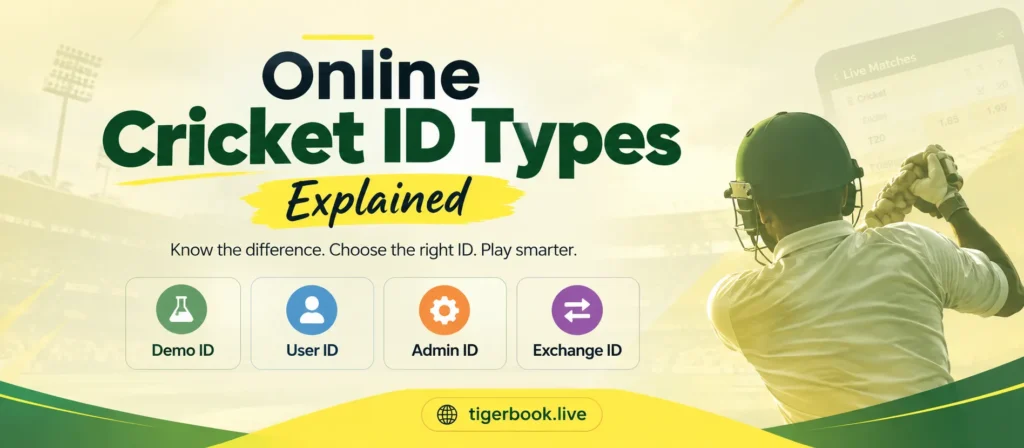
Before requesting an online cricket ID, it is important to understand what type of ID you actually need. A User ID, Demo ID, Admin ID and Exchange ID may all be connected to the same cricket platform, but they do not provide the same access or permissions.
Four main online cricket id types
The four commonly discussed types are:
Demo ID
Practice with virtual balance.
User ID
Deposit, bet and withdraw.
Admin ID
Create users, set limits, settle.
Exchange ID
A brand-specific login.
Demo ID
A Demo ID lets you practice with virtual balance. No real money moves. You see the same markets, the same odds movement, and the same layout, but nothing can be withdrawn.
Common functions:
- Explore the platform interface.
- Understand dashboard navigation.
- View available sections.
- Learn how different features are organised.
Real example:
A first-time user asks for a Demo ID on the day of a big match. He spends thirty minutes checking how session lines move after a boundary or a wicket. Once he feels comfortable, he switches to a real User ID. The Demo ID expires or stays limited to practice only.
User ID
A User ID is the personal account you bet from. You log in, add funds, pick a market and place your bet. Every regular player holds one, and it works with real money.
The limits on it are set by the person who created it. You see your balance, your open bets and your profit and loss. You cannot create other logins or change your own limits.
Common functions:
- Individual account login.
- Access to permitted cricket sections.
- Personal account information.
- Account balance and transaction history, where supported.
- Access to features enabled for that user.
Real example:
Rahul gets a User ID on an exchange and adds 500 rupees by UPI. He backs Mumbai Indians in match odds and watches his balance move through the match. He never sees the panel behind it.
Admin ID
An Admin ID (sometimes called Master ID) sits one level higher. You can create multiple sub-user accounts under it, set credit limits, and settle balances with those users. It is built for people who already run a small book or manage a group.
Real example:
A local operator in Lucknow takes an Admin ID. He creates five User IDs for regular clients, sets a daily limit on each, and settles the accounts at the end of the day. He never places large personal bets on the Admin login itself. The control and settlement tools stay with him.
Exchange ID
An Exchange ID is a brand-specific login. It belongs to a particular exchange panel such as Diamond Exchange, Lords Exchange or Sky Exchange. The markets, liquidity and interface come from that brand. People often say “Diamond Exchange ID” or “Lords Exchange ID” when they want that exact panel.
Real example:
A regular session trader asks for a Diamond Exchange ID. He receives login details that open directly on the Diamond panel. The back-and-lay depth on IPL matches feels familiar to him, so he stays with that brand instead of a generic User ID.
Who uses what, side by side
| ID type | Who uses it | What it does | Real money | Best for |
|---|---|---|---|---|
| Exchange ID | Players choosing a brand | Gives you an account on a named platform, like Diamond Exchange | Yes | Picking the brand you trust |
| User ID | Regular players | Lets you deposit, bet and withdraw | Yes | Anyone who wants to play |
| Admin ID | Owners and master agents | Creates user IDs, sets limits, checks reports | Yes, handled for others | People running a panel |
| Demo ID | First-timers | Practice with virtual points | No | Learning before you pay |
Things to Check Before Getting a Cricket ID
Before requesting any cricket ID, take a few minutes to understand the account details.
Here are five important things to check.
1. Account Features
Ask which features are available with your selected ID. Do not assume that every account provides the same access.
2. Registration Requirements
Understand what details or documents are needed to complete registration.
3. Demo Account Access
If you want a Demo ID, check whether it offers a sample platform or only limited viewing access.
4. Account Safety
Check how to change your password and how to contact support if you cannot access your account.
5. Rules and Conditions
Read the account terms, age requirements and local legal rules before registering.
A quick legal note. Online betting rules in India changed in 2025, and several states have their own bans. Check your state’s rules first. This is information, not legal advice, and you must be 18 or older.
FAQs
No. A demo ID runs on virtual points with no cash value, so there is nothing to withdraw.
It depends on the provider. Many give a user ID within a few minutes once your details and first deposit are in.
You can hold IDs on different exchanges. Keep track of each balance and password so nothing gets mixed up.
Yes, in simple terms. The ID is your login, and the account behind it holds your balance and bet history.
Ask for the exchange name and check that the site loads correctly. Be careful with anyone who rushes you to pay or hides the withdrawal terms.
It changes from one exchange and provider to another. Ask before you pay, and get the number in writing.
No. Anyone with your password can use your balance, so keep it private and change it if you shared it.
Final Thoughts
User IDs, Demo IDs, Admin IDs and Exchange IDs serve four different purposes within an online cricket platform. A User ID provides individual access, a Demo ID helps users explore available features, an Admin ID supports authorised account management, and an Exchange ID provides access to exchange-based features.
Tigerbook provides cricket ID services across these account categories. Contact its official support team to confirm current availability, eligibility and the registration requirements for your requested ID.